K (Benutzername entfernt) (Logbucheinzelheiten entfernt) |
Keine Bearbeitungszusammenfassung |
||
| Zeile 41: | Zeile 41: | ||
Full Name: ''Ihr Name ''<br /> | Full Name: ''Ihr Name ''<br /> | ||
Domain: sip3.phone.iway.ch<br /> | Domain: sip3.phone.iway.ch<br /> | ||
User Name: ''Ihr iWay SIP Benutzername (siehe | User Name: ''Ihr iWay SIP Benutzername (siehe [https://wiki.iway.ch/kb/wiki/Kundenportal_(login.iway.ch)/Abonnement-Zugangsdaten_auslesen iWay Login])''<br /> | ||
Password: ''Ihr iWay SIP Passwort (siehe | Password: ''Ihr iWay SIP Passwort (siehe [https://wiki.iway.ch/kb/wiki/Kundenportal_(login.iway.ch)/Abonnement-Zugangsdaten_auslesen iWay Login]) '' | ||
3. Bestätigen Sie mit "Done". | 3. Bestätigen Sie mit "Done". | ||
| Zeile 147: | Zeile 147: | ||
</div> | </div> | ||
{{AttachmentsSectionStart}} | {{AttachmentsSectionStart}} | ||
* [[ | * [[Medium:KB_VoIP_Telefonie_Konfigurationen_Softphones_&_Apps_Softphone_Telephone_fuer_macOS_von_64_Characters_(mit_iWay_VoIP_Home_&_myKMU)Screenshot_2022-12-21_at_13.19.44.png]] | ||
* [[ | * [[Medium:KB_VoIP_Telefonie_Konfigurationen_Softphones_&_Apps_Softphone_Telephone_fuer_macOS_von_64_Characters_(mit_iWay_VoIP_Home_&_myKMU)Screenshot_2022-12-21_at_13.26.25.png]] | ||
* [[ | * [[Medium:KB_VoIP_Telefonie_Konfigurationen_Softphones_&_Apps_Softphone_Telephone_fuer_macOS_von_64_Characters_(mit_iWay_VoIP_Home_&_myKMU)Screenshot_2022-12-21_at_13.31.49.png]] | ||
* [[ | * [[Medium:KB_VoIP_Telefonie_Konfigurationen_Softphones_&_Apps_Softphone_Telephone_fuer_macOS_von_64_Characters_(mit_iWay_VoIP_Home_&_myKMU)Screenshot_2022-12-21_at_13.36.59.png]] | ||
* [[ | * [[Medium:KB_VoIP_Telefonie_Konfigurationen_Softphones_&_Apps_Softphone_Telephone_fuer_macOS_von_64_Characters_(mit_iWay_VoIP_Home_&_myKMU)Screenshot_2022-12-21_at_13.41.36.png]] | ||
* [[ | * [[Medium:KB_VoIP_Telefonie_Konfigurationen_Softphones_&_Apps_Softphone_Telephone_fuer_macOS_von_64_Characters_(mit_iWay_VoIP_Home_&_myKMU)Screenshot_2022-12-21_at_13.46.29.png]] | ||
* [[ | * [[Medium:KB_VoIP_Telefonie_Konfigurationen_Softphones_&_Apps_Softphone_Telephone_fuer_macOS_von_64_Characters_(mit_iWay_VoIP_Home_&_myKMU)Screenshot_2022-12-21_at_13.50.11.png]] | ||
* [[ | * [[Medium:KB_VoIP_Telefonie_Konfigurationen_Softphones_&_Apps_Softphone_Telephone_fuer_macOS_von_64_Characters_(mit_iWay_VoIP_Home_&_myKMU)Screenshot_2022-12-21_at_13.36.59.png]] | ||
* [[ | * [[Medium:KB_VoIP_Telefonie_Konfigurationen_Softphones_&_Apps_Softphone_Telephone_fuer_macOS_von_64_Characters_(mit_iWay_VoIP_Home_&_myKMU)Screenshot_2022-12-21_at_13.41.36.png]] | ||
* [[ | * [[Medium:KB_VoIP_Telefonie_Konfigurationen_Softphones_&_Apps_Softphone_Telephone_fuer_macOS_von_64_Characters_(mit_iWay_VoIP_Home_&_myKMU)Screenshot_2022-12-21_at_13.46.29.png]] | ||
* [[ | * [[Medium:KB_VoIP_Telefonie_Konfigurationen_Softphones_&_Apps_Softphone_Telephone_fuer_macOS_von_64_Characters_(mit_iWay_VoIP_Home_&_myKMU)Screenshot_2022-12-21_at_13.50.11.png]] | ||
* [[ | * [[Medium:KB_VoIP_Telefonie_Konfigurationen_Softphones_&_Apps_Softphone_Telephone_fuer_macOS_von_64_Characters_(mit_iWay_VoIP_Home_&_myKMU)Screenshot_2022-12-21_at_13.19.44.png]] | ||
* [[ | * [[Medium:KB_VoIP_Telefonie_Konfigurationen_Softphones_&_Apps_Softphone_Telephone_fuer_macOS_von_64_Characters_(mit_iWay_VoIP_Home_&_myKMU)Screenshot_2022-12-21_at_13.26.25.png]] | ||
* [[ | * [[Medium:KB_VoIP_Telefonie_Konfigurationen_Softphones_&_Apps_Softphone_Telephone_fuer_macOS_von_64_Characters_(mit_iWay_VoIP_Home_&_myKMU)Screenshot_2022-12-21_at_13.31.49.png]] | ||
{{AttachmentsSectionEnd}} | {{AttachmentsSectionEnd}} | ||
<!-- From bodyContent 79233420.mraw --> | <!-- From bodyContent 79233420.mraw --> | ||
Version vom 24. März 2025, 15:50 Uhr
Hierbei handelt es sich um eine Softphone App von einem Drittanbieter für die iWay keinen Support bieten kann. Wir haben aber diese Anleitung erstellt damit Sie die App einrichten können.
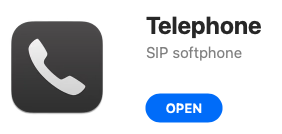
1. Laden Sie sich die App aus dem Apple App store herunter. Sie finden den Link dazu auf der Website des Herstellers: https://www.64characters.com/telephone/
Screenshot_2022-12-21_at_13.19.44.png)
2. Starten Sie die App und geben Sie folgende Angaben ein.
Full Name: Ihr Name
Domain: sip3.phone.iway.ch
User Name: Ihr iWay SIP Benutzername (siehe iWay Login)
Password: Ihr iWay SIP Passwort (siehe iWay Login)
3. Bestätigen Sie mit "Done".
Screenshot_2022-12-21_at_13.26.25.png)
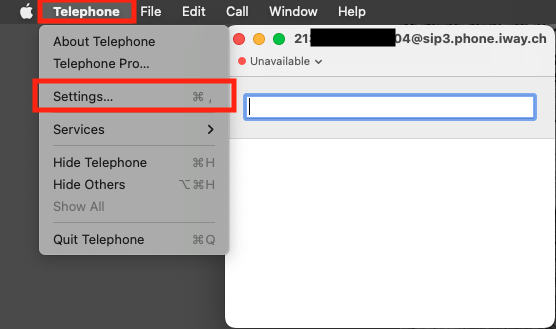
4. Öffnen Sie die Einstellungen über die Menü Bar oder wählen Sie die Tastenkombination " cmd , " während Sie die App offen haben.
Screenshot_2022-12-21_at_13.31.49.png)
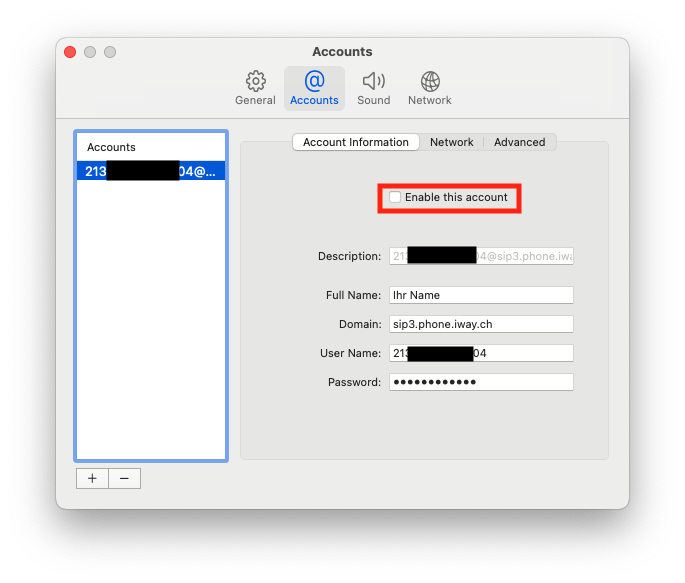
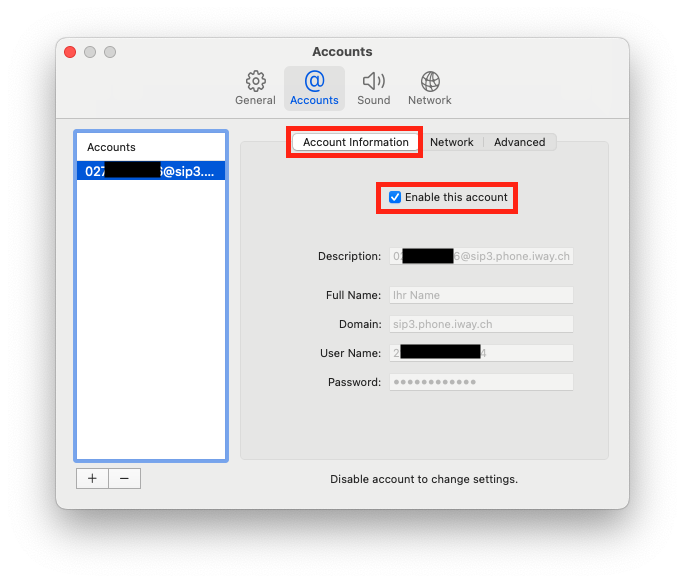
5. Öffnen Sie das Menü "Accounts"
6. Entfernen Sie den Haken bei "Enable this Account" damit Sie die Einstellungen bearbeiten können.
Screenshot_2022-12-21_at_13.36.59.png)
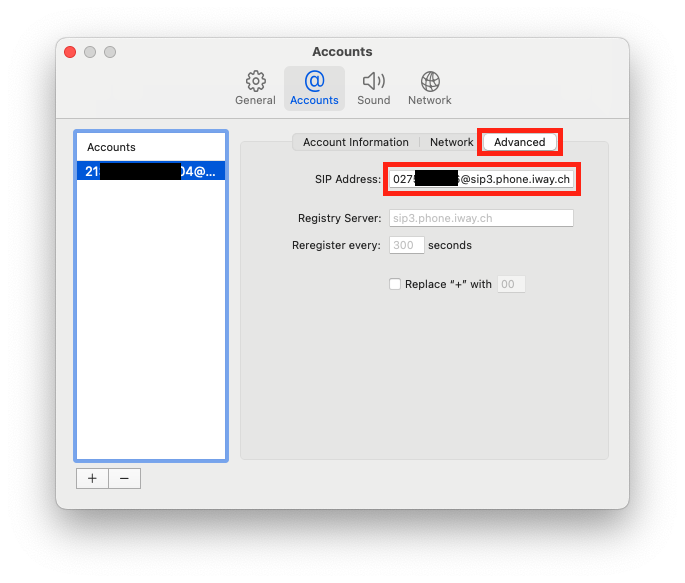
7. Im Untermenü "Advanced" tragen Sie bitte folgendes in das Feld "SIP Adress" ein: IhreTelefonnummer@sip3.phone.iway.ch
Wenn Ihre Telefonnummer z.B. 0441234567 ist, tragen Sie in das Feld 0441234567@sip3.phone.iway.ch ein.
Screenshot_2022-12-21_at_13.41.36.png)
8. Gehen Sie zurück ins Untermenü "Account Information" und setzen Sie den Haken bei "Enable this Account".
Screenshot_2022-12-21_at_13.46.29.png)
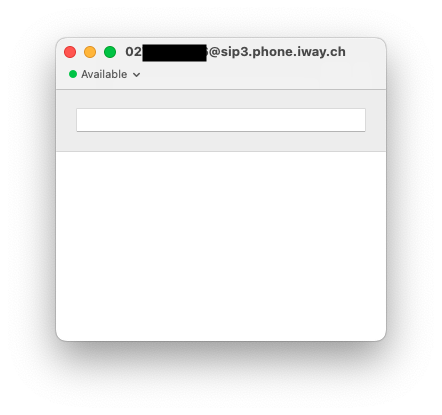
9. Wenn dies korrekt gemacht wurde, wird nun der Status in der App mit einem grünen Punkt angezeigt und Sie können Anrufe führen.
Screenshot_2022-12-21_at_13.50.11.png)
Attachments
- Medium:KB_VoIP_Telefonie_Konfigurationen_Softphones_&_Apps_Softphone_Telephone_fuer_macOS_von_64_Characters_(mit_iWay_VoIP_Home_&_myKMU)Screenshot_2022-12-21_at_13.19.44.png
- Medium:KB_VoIP_Telefonie_Konfigurationen_Softphones_&_Apps_Softphone_Telephone_fuer_macOS_von_64_Characters_(mit_iWay_VoIP_Home_&_myKMU)Screenshot_2022-12-21_at_13.26.25.png
- Medium:KB_VoIP_Telefonie_Konfigurationen_Softphones_&_Apps_Softphone_Telephone_fuer_macOS_von_64_Characters_(mit_iWay_VoIP_Home_&_myKMU)Screenshot_2022-12-21_at_13.31.49.png
- Medium:KB_VoIP_Telefonie_Konfigurationen_Softphones_&_Apps_Softphone_Telephone_fuer_macOS_von_64_Characters_(mit_iWay_VoIP_Home_&_myKMU)Screenshot_2022-12-21_at_13.36.59.png
- Medium:KB_VoIP_Telefonie_Konfigurationen_Softphones_&_Apps_Softphone_Telephone_fuer_macOS_von_64_Characters_(mit_iWay_VoIP_Home_&_myKMU)Screenshot_2022-12-21_at_13.41.36.png
- Medium:KB_VoIP_Telefonie_Konfigurationen_Softphones_&_Apps_Softphone_Telephone_fuer_macOS_von_64_Characters_(mit_iWay_VoIP_Home_&_myKMU)Screenshot_2022-12-21_at_13.46.29.png
- Medium:KB_VoIP_Telefonie_Konfigurationen_Softphones_&_Apps_Softphone_Telephone_fuer_macOS_von_64_Characters_(mit_iWay_VoIP_Home_&_myKMU)Screenshot_2022-12-21_at_13.50.11.png
- Medium:KB_VoIP_Telefonie_Konfigurationen_Softphones_&_Apps_Softphone_Telephone_fuer_macOS_von_64_Characters_(mit_iWay_VoIP_Home_&_myKMU)Screenshot_2022-12-21_at_13.36.59.png
- Medium:KB_VoIP_Telefonie_Konfigurationen_Softphones_&_Apps_Softphone_Telephone_fuer_macOS_von_64_Characters_(mit_iWay_VoIP_Home_&_myKMU)Screenshot_2022-12-21_at_13.41.36.png
- Medium:KB_VoIP_Telefonie_Konfigurationen_Softphones_&_Apps_Softphone_Telephone_fuer_macOS_von_64_Characters_(mit_iWay_VoIP_Home_&_myKMU)Screenshot_2022-12-21_at_13.46.29.png
- Medium:KB_VoIP_Telefonie_Konfigurationen_Softphones_&_Apps_Softphone_Telephone_fuer_macOS_von_64_Characters_(mit_iWay_VoIP_Home_&_myKMU)Screenshot_2022-12-21_at_13.50.11.png
- Medium:KB_VoIP_Telefonie_Konfigurationen_Softphones_&_Apps_Softphone_Telephone_fuer_macOS_von_64_Characters_(mit_iWay_VoIP_Home_&_myKMU)Screenshot_2022-12-21_at_13.19.44.png
- Medium:KB_VoIP_Telefonie_Konfigurationen_Softphones_&_Apps_Softphone_Telephone_fuer_macOS_von_64_Characters_(mit_iWay_VoIP_Home_&_myKMU)Screenshot_2022-12-21_at_13.26.25.png
- Medium:KB_VoIP_Telefonie_Konfigurationen_Softphones_&_Apps_Softphone_Telephone_fuer_macOS_von_64_Characters_(mit_iWay_VoIP_Home_&_myKMU)Screenshot_2022-12-21_at_13.31.49.png